
How Canva built an Agentic Support Experience using Langfuse
Learn how Canva's 4-person ML team built an AI support experience surpassing all baseline evaluation targets, powered by Langfuse observability across Java and Python stacks.
 Felix Krauth
About Canva
Canva is the visual communication platform used by over 250 million monthly active users worldwide. From presentations to social media graphics to full brand kits, Canva has democratized design for individuals and enterprises alike.
Building a Multi-Agent Support Experience
Canva is building on Langfuse to develop and operate their agentic customer support experience. Their setup has evolved from a simple chat experience to a multi-layered and multi-agent system with access to many tools, sub-agents, and internal systems of record for context retrieval.
The core revolves around the in-app chat (Help Assistant) and an asynchronous ticket resolution agent (Omni Agent).
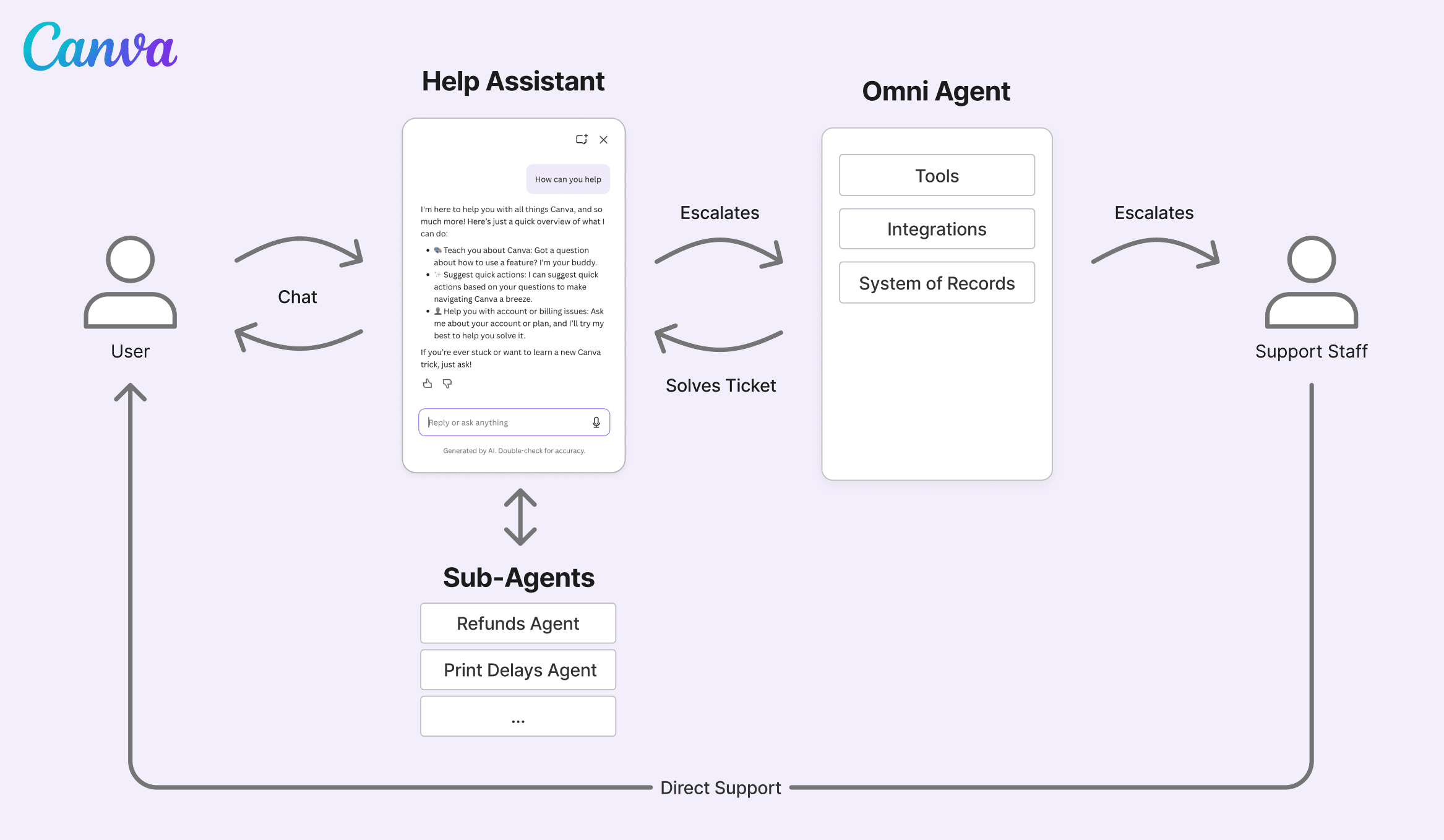
Help Assistant: The Help Assistant is the user-facing chat panel that handles the majority of support volume. When a user opens the help interface, their query gets routed to specialized sub-agents:
- Design assistance - “How do I remove a background?”
- Account actions - Refunds, subscription changes
- Feature requests - Routed to bug lists and roadmaps
Omni Agent: Omni Agent is a more sophisticated system that works asynchronously on submitted tickets. It interfaces with users through the Help Assistant or e-mail. If Omni Agent can’t resolve the ticket, it escalates to human support.
“We call it Omni Agent because it has access to a large amount of tools, functionalities, and user data,” says Andreas. “It can dig into account history, execute complex multi-step resolutions, and handle edge cases the fast path can’t.”
Two Stacks, one Platform
Canva’s multi-language architecture made handling different tech stacks a core requirement for their LLM operations platform.
Help Assistant runs on Java, the backbone of much of Canva’s infrastructure. The team integrated via OpenTelemetry, which doesn’t lock them into a single observability solution.
Omni Agent runs as a Python ML worker, taking full advantage of Langfuse’s native Python SDK and the faster iteration cycles that come with it.
How Canva uses Langfuse
Canva takes full advantage of the entire Langfuse suite across Observability, Prompt Management and Evaluation. What started as a tight engineering core has expanded across roles:
- ML Engineers: Deep debugging, trace analysis, online and offline evaluation setup
- Product Managers: Prompt iteration, replay testing, quality monitoring
- QA Team: Annotation queues, systematic quality scoring
- Content Designers: Maintaining and improving response and RAG content
- Domain Experts : Topic-, market- or language-specific QA
One example: Canva’s Japanese market requires precise formal business tones. A marketing manager in Japan set up a dedicated LLM-as-a-judge evaluator to monitor tone of voice, without engineering help. This is a massive enabler: the person who knows the subject matter best can build and run evaluators independently.
"We have realized that to build good AI systems, you need to inject domain expertise which is not within an engineer's scope. Langfuse makes that possible. It hits the sweet spot between engineering requirements and empowerment of non-technical users to contribute their domain expertise.

Tracing for Debugging
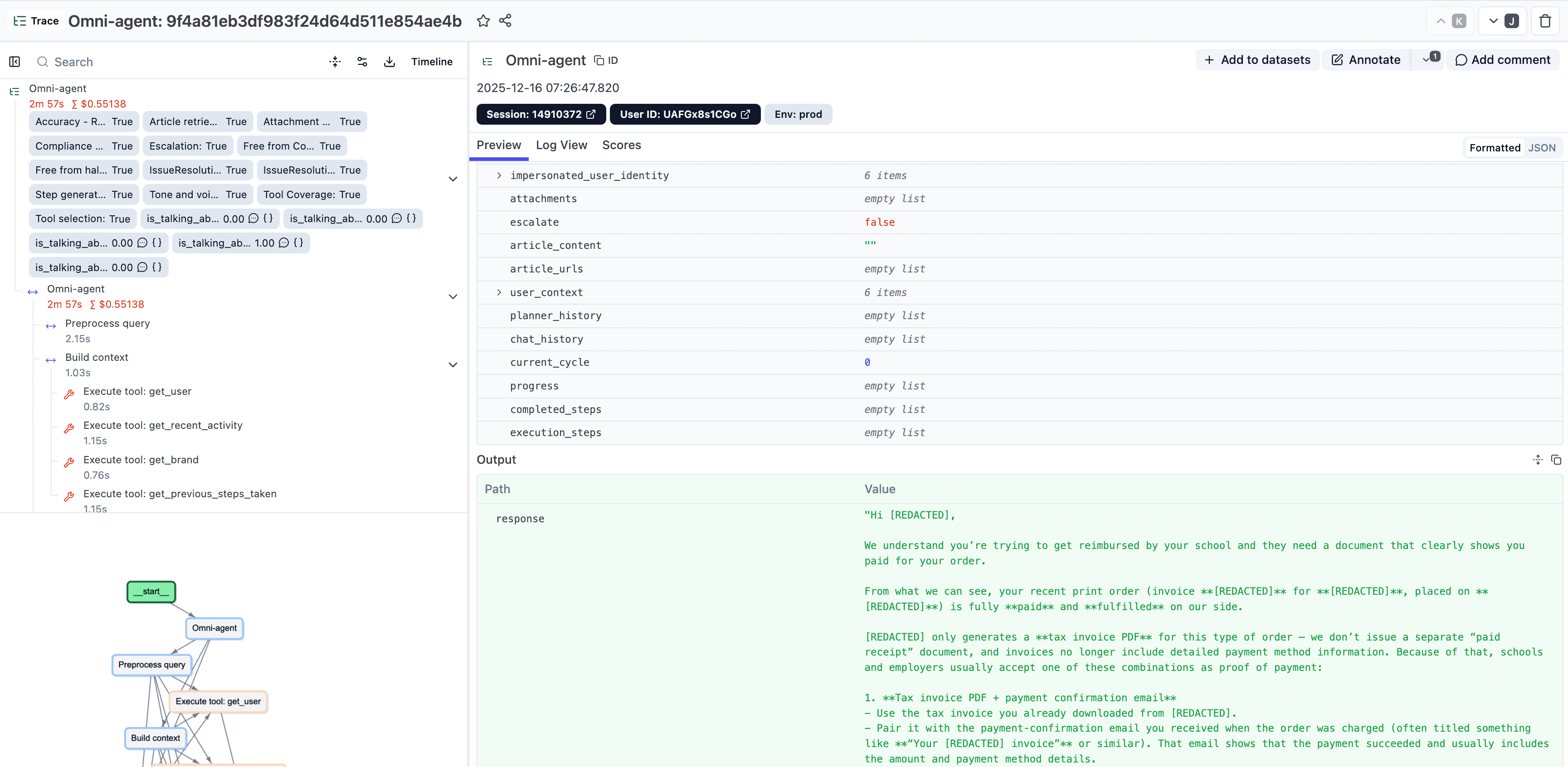
The Tracing captures error information, warnings, and metadata across every step. Engineers use Metadata and Tags to search and filter efficiently, while the Playground replay functionality lets anyone re-run a generation with the exact system prompt of that moment, critical for reproducing issues.
Prompt Management
Langfuse’s Prompt Management has become a key enabler. Prompts are versioned, changes can be tested before deployment, and critically, non-technical team members can make updates independently.
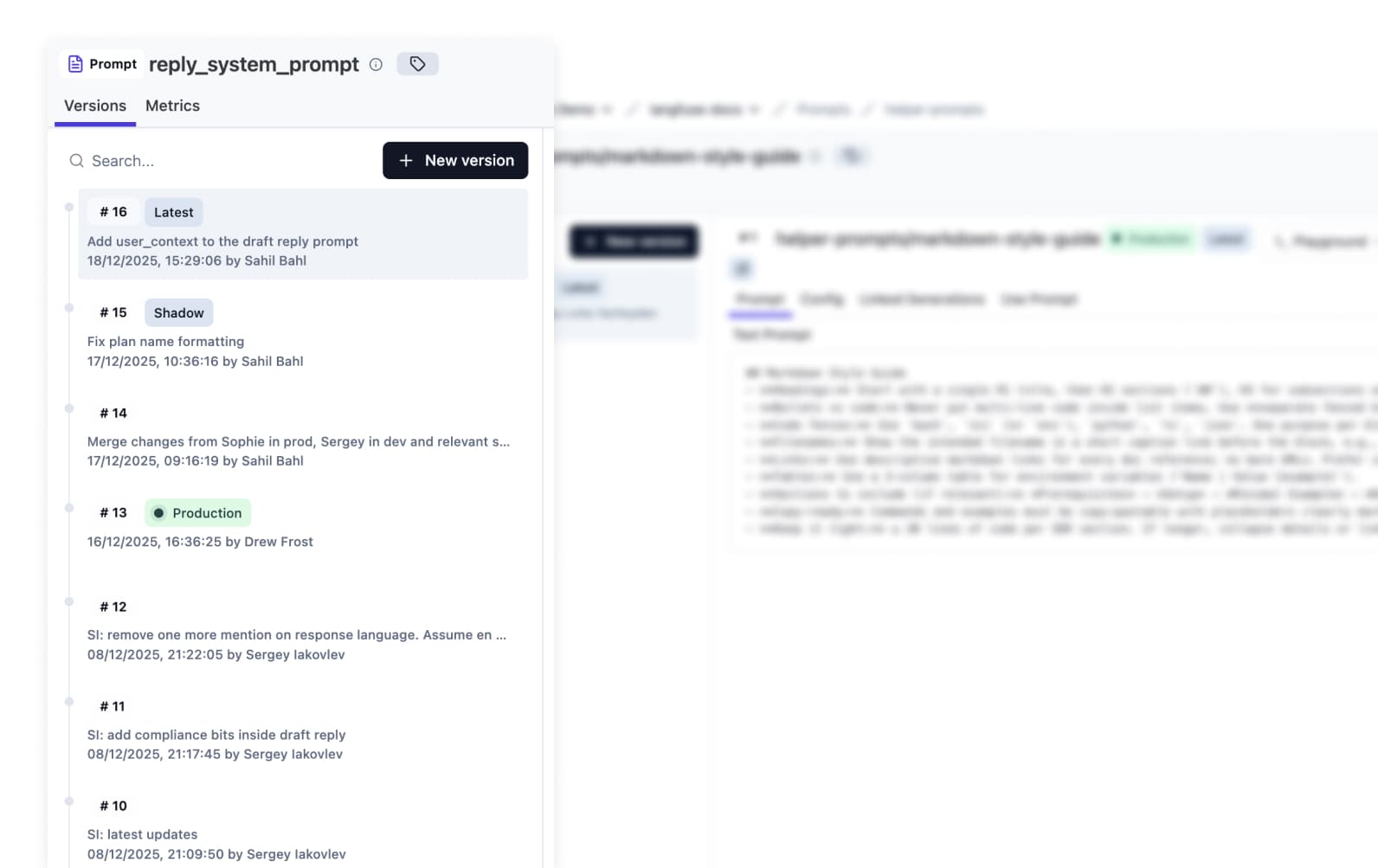
“The prompt management system is well-designed,” says Sergey. “Versioning, the ability to promote or rollback changes from and to production, is a big enabler. When product managers can make changes without involving engineering, it frees up a lot of time and makes everything faster.”
Evals and Experiments
While both systems, Help Assistant and Omni Agent, differ in request volume and integration complexity, the team has over time unified their approaches for evals with only some differences. “If something works well in one system, we quickly implement it for the other as well,” says Sergey.
Here are Canva’s approaches to offline and online Evals:
-
Experiments & Datasets: In development, both systems can be tested by running offline Experiments based on data stored in Datasets. Canva has stored input data for default paths and edge cases together with their expected outputs. To make agents with access to tools testable the team is mocking tool call responses during experiments.
-
LLM-as-a-Judge: Both systems are running slightly different sets of evaluators scoring them across 15-20 metrics both offline (in development) and online (in production).
-
Custom Scores: Additionally to LLM-as-a-Judge, Canva has implemented custom deterministic scoring logic via API/SDK which is executed during offline Experiments.
-
Human Annotation: To complement automated online/offline evals the QA team runs systematic manual annotation workflows to manually inspect 20-100 production cases per week.
-
Shadow Mode: To test Omni Agent with real system data Canva often deploys changes with a “shadow mode” flag. This allows them to test Omni Agent behavior in production without affecting the overall UX. They are using prompt deployment labels to manage this workflow.
From Self-Hosting to Cloud
Canva started on self-hosting during early product development but then migrated to Langfuse Cloud to reduce internal workload and focus on building the best possible AI support system.
“I could just run Langfuse locally. Being open source is a huge differentiator. It lets the team validate the tooling before kicking off all required approvals in legal and procurement,” says Sergey.
Once the value was proven, they migrated to Langfuse Cloud. “Running such a large system at scale means we need to maintain a lot with our own team,” Sergey explains. “We don’t have capacity for all the maintenance. It’s a platform effort.”
Why Canva chose Langfuse
The team evaluated several LLM observability platforms. Langfuse won for several reasons:
- Open source: Allowed Sergey to build confidence into Langfuse’s capabilities before engaging in commercial discussions
- Framework agnostic: Canva uses raw LLM clients, no frameworks
- OpenTelemetry support: Critical for the Java stack, no vendor lock-in
- End-to-end LLM operations platform: Full suite across observability, prompt management, and evaluation
- Shipping velocity: “Other vendors came back with Figma prototypes. Meanwhile, Langfuse shipped two features. That’s when we knew.”
"Langfuse makes our engineers' life so much easier. Without Langfuse, our AI systems would be a black box. Only engineers would know what's happening, and only after deep investigation into logs.

Business Impact
Driving better user experiences
Building on Langfuse a 4-person team enabled Canva to automate repeatable support requests driving better resolutions for our users at lower cost.
Multi-Agent System at Scale
AI support handles 80% of user interactions across 250M monthly active users through a sophisticated multi-agent architecture.
Faster Iteration Speed
Engineers ship faster and domain experts are empowered to directly improve the system without requiring engineering.
Improved AI Output Quality
The overall system quality significantly improved through the inclusion of non-technical team members and domain experts.
Single Platform across Tech Stacks
Langfuse runs for both Canva's Java and Python stacks, enabling a single observability platform for their entire multi-agent support system.
Ready to get started with Langfuse?
Join thousands of teams building better LLM applications with Langfuse's open-source observability platform.
No credit card required • Free tier available • Self-hosting option